Available Models
The Model slugs you can call through CodeVector, resolved from your access grants. Includes pricing, context windows, and capability flags.
Your gateway URL
Pin your own gateway hostname and we'll rewrite the routes and curl examples on every docs page so you can click straight through to the live console. Stored locally in your browser.
The Available Models page at /models lists every Model facade you can call through the gateway. The list is resolved from your access grants - direct grants on your user plus grants from any groups you belong to.
What you see
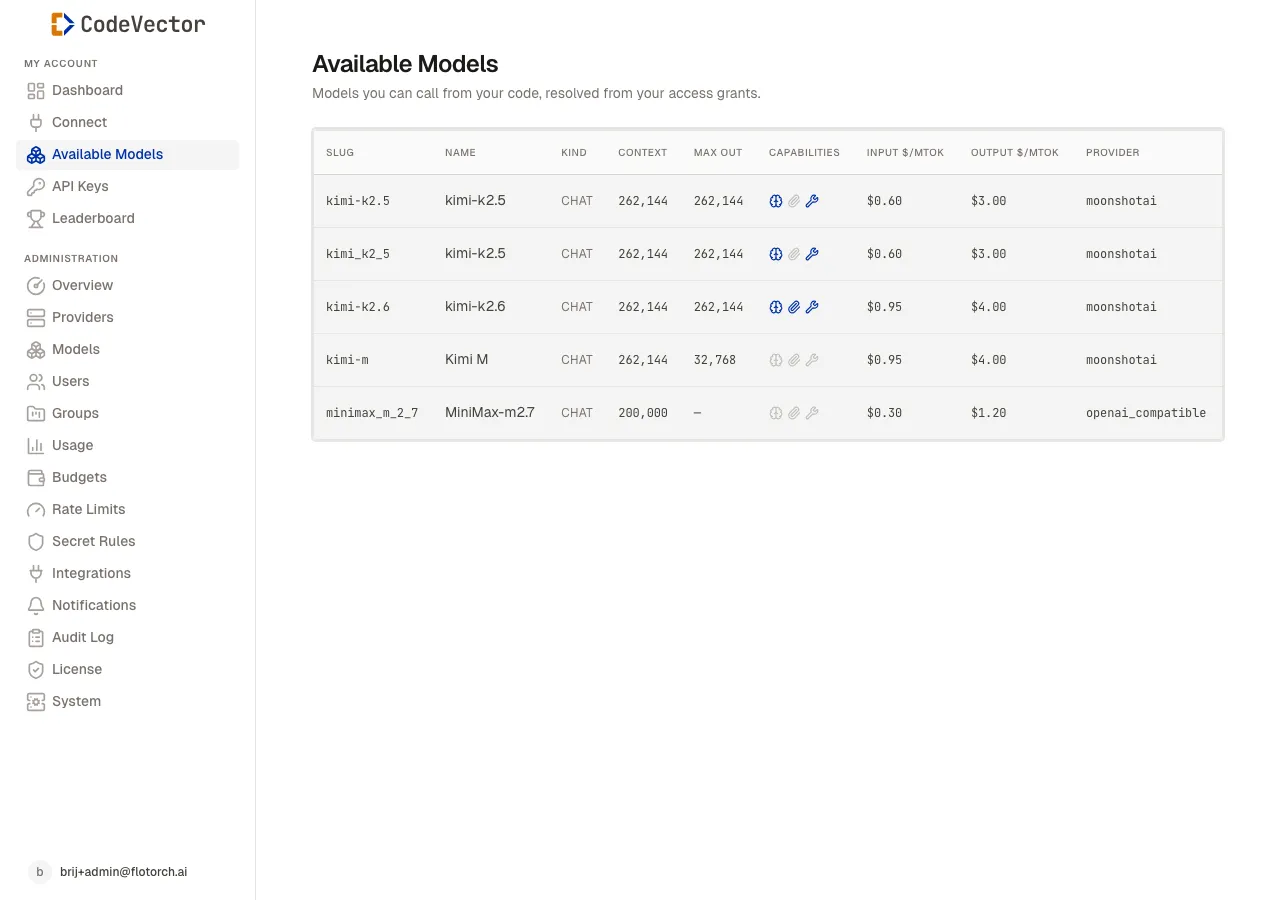
The Available Models page at /models shows every Model slug your access grants allow.
- Slug - the identifier you pass as the
modelfield in API requests. Shown in monospace. - Name - human-readable display name.
- Kind -
chatorembedding. - Context - max input tokens.
- Max out - max output tokens for a single response.
- Capabilities - three icons indicating reasoning, attachment, and tool-call support on the underlying upstream.
- Input $/Mtok and Output $/Mtok - configured pricing per million tokens, used to compute spend.
- Provider - which upstream kind currently serves this Model (OpenAI, Anthropic, Bedrock, etc.).
The list is paginated. Use the page controls at the bottom if your team has many granted models.
Using a slug
Pass the slug exactly as shown in the table. Both protocols accept it:
# OpenAI-compatible
curl https://your-gateway.example.com/gateway/openai/v1/chat/completions \
  -H "Authorization: Bearer cv_..." \
  -H "Content-Type: application/json" \
  -d '{"model": "claude-sonnet-4", "messages": [{"role":"user","content":"hi"}]}'

# Anthropic-compatible
curl https://your-gateway.example.com/gateway/anthropic/v1/messages \
  -H "x-api-key: cv_..." \
  -H "Content-Type: application/json" \
  -H "anthropic-version: 2023-06-01" \
  -d '{"model": "claude-sonnet-4", "max_tokens": 1024, "messages": [{"role":"user","content":"hi"}]}'
The gateway routes the request to the appropriate Provider Model automatically. You always reference the Model slug; the underlying provider is an admin concern.
What’s not in the list
- Provider Models - the upstream model identifiers (
gpt-4o,claude-sonnet-4-5-20250929) are not addressable from your API key. Always pass the Model slug. - Disabled models - admins can disable a Model facade. Disabled models disappear from this list and return a model-not-found error if your code keeps using their slug.
- Models you weren’t granted - missing grants mean missing rows. Ask an admin to add a grant.
Frequently asked questions
Why is a model I expected missing?
You only see Models that an admin has granted to your user or to a group you belong to. If a model is missing, ask your admin to add a grant on the user or group detail page.
What does the Capabilities column mean?
Three icons - reasoning, attachments, and tools. Filled means the underlying upstream supports that capability. The gateway forwards capability fields verbatim, so a request that uses tools will fail if the chosen model does not support them.
Why are some prices shown as a dash?
A dash means no price is configured on the Provider Model. The request still goes through, but it will not contribute to spend totals on the dashboard or to budget caps. Ask your admin to set pricing on that Provider Model.
Are the slugs stable?
Slugs are admin-controlled. Once published, an admin can disable a Model but cannot change its slug without breaking existing client code. Treat them as a contract.
Related docs
- Connect. Wire your IDE to the gateway and start using these slugs.
- API Keys. The bearer token your requests send.
- codevector CLI. Run
codevector models listto see the same data on the command line. - Models. The admin-side view of how Model facades and backends are configured.