Catalog sync
Update the bundled model catalog in CodeVector. Preview new, updated, and deprecated entries before applying. Existing Provider Model overrides are preserved.
Your gateway URL
Pin your own gateway hostname and we'll rewrite the routes and curl examples on every docs page so you can click straight through to the live console. Stored locally in your browser.
The model catalog is the bundled list of upstream models with default pricing, context windows, and capability flags. It ships inside the CodeVector binary and is versioned independently. When you upgrade CodeVector, the binary may carry a newer catalog than what’s applied to your database. The Settings page lets you sync that new catalog with full diff visibility and zero risk to your existing Provider Models.
What the catalog is
The catalog has two layers:
- The reference catalog - the bundled list of upstream models with default metadata, one entry per
(provider, model id)pair. Read-only: only sync updates it. - Your Provider Models - the entries you actually use, scoped to a configured Provider. These are imported from the catalog and can be edited (pricing override, context window override, custom models the catalog does not have).
Sync only updates the reference catalog. Your Provider Models are never touched, so customer overrides win: if you set a custom price on a Provider Model, that override stays in place regardless of how many times you sync.
When to sync
Open the Settings page at /admin/settings. The Model Catalog card shows three values:
- Current version - the catalog version applied to the database.
- Source -
bundled(from this binary) or a remote sync URL if you opted into the remote catalog feed. - Bundled in binary - the catalog version baked into the running CodeVector image.
When Bundled in binary is newer than Current version, a newer available badge appears. Sync when you see it.
Running a sync
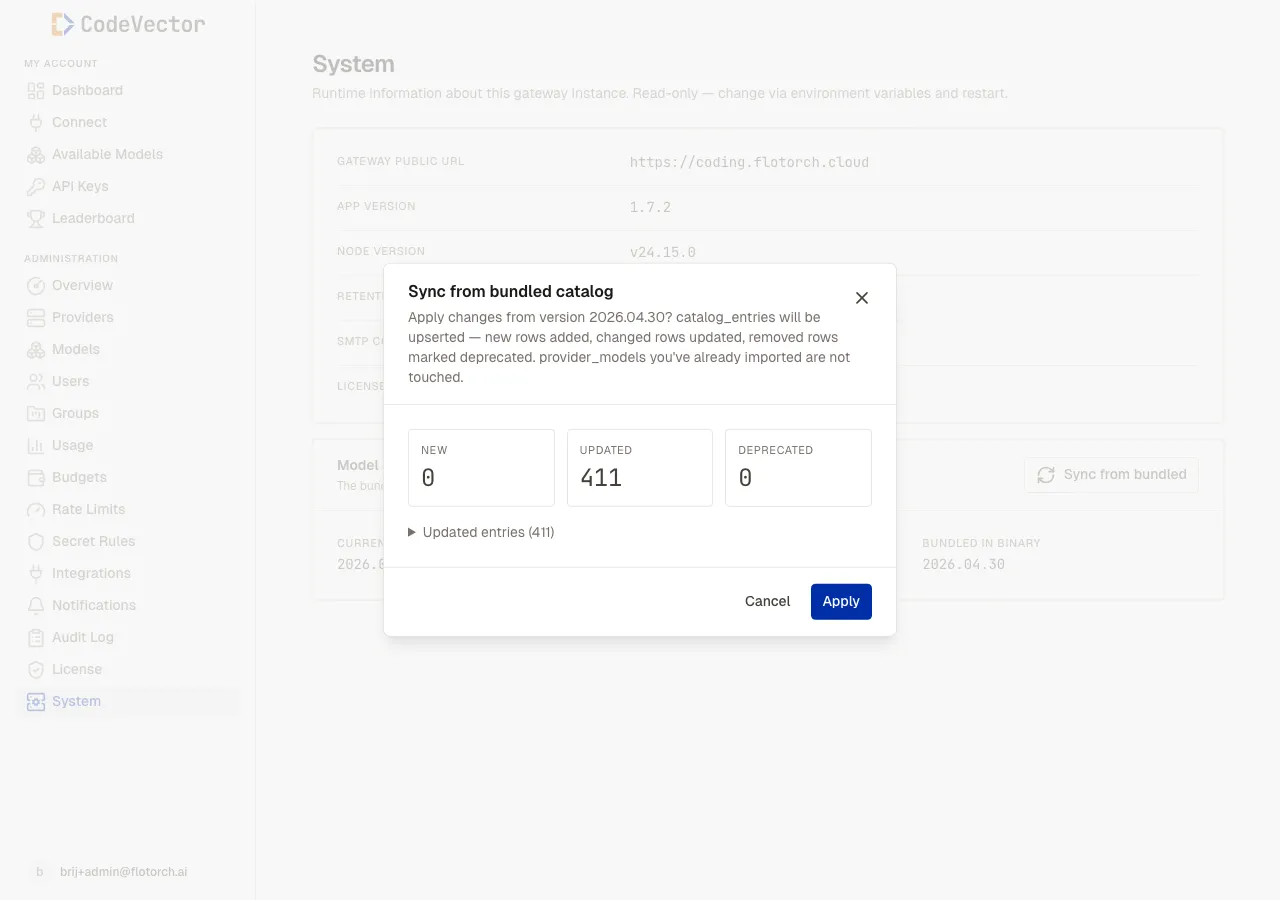
The sync modal previews the diff between the bundled catalog and your database. Nothing is written until you click Apply.
Click Sync from bundled on the Settings page. A modal opens and computes the diff:
- New - catalog entries that exist in the bundled version but not in the database. Imports of these will pick them up next time you click Import from catalog on a Provider.
- Updated - catalog entries with changed metadata in the bundled version. The most common change is pricing - upstream providers cut prices, the catalog reflects it. Updated entries do not push changes into your existing Provider Models; they only update the catalog reference.
- Deprecated - entries the bundled version no longer carries. Your existing Provider Models pointing at them keep working - we just stop offering them on new imports.
Expand each section in the modal to see the exact provider_kind/upstream_model_id pairs.
When you’re satisfied, click Apply. The upsert is atomic: either every row is updated or none of them are. The toast confirms the version that was applied and how many rows changed.
After syncing
For new entries to appear in a Provider’s Provider Models table, you have to re-import:
- Open Providers and click the row for the provider you want to refresh.
- On the provider detail page, click Import from catalog.
- Existing Provider Models are skipped; only the new entries are added.
Updated pricing on existing rows is not retroactively pushed. If you want the new prices, update the Provider Models row manually or delete and re-import. This is intentional: pricing changes can shift budget enforcement, so the system never changes enforcement behavior automatically.
Catalog source modes
By default the catalog is bundled in the binary. You can switch to a remote signed feed by setting ENABLE_REMOTE_CATALOG=true plus CATALOG_SYNC_URL and CATALOG_SYNC_PUBKEY in your environment (see Configuration). With remote enabled:
- The Settings page Source field shows the remote URL.
- A scheduled job periodically fetches and verifies the signed catalog.
- The same diff/apply UI is used for any pending changes.
Remote catalog is useful if you want to receive interim catalog bumps without waiting for the next CodeVector release.
Frequently asked questions
Will syncing change models I’ve already imported?
No. Sync only updates the reference catalog. Your Provider Models, including any custom pricing or context window overrides you set, are left exactly as they were.
What does deprecated mean?
Models removed from the bundled catalog are marked deprecated rather than deleted. Existing Provider Models pointing at them keep working. New imports skip deprecated entries.
How often does the catalog change?
The bundled catalog is bumped roughly every two weeks alongside CodeVector releases. The newer available badge appears on the Settings page when the binary you’re running has a newer version than what’s applied.
I synced but my provider doesn’t show the new models.
Sync only updates the catalog. Open the provider detail page and click Import from catalog to bring the new entries into that provider’s Provider Models table.
Can I roll back a sync?
Not from the UI today. Sync is forward-only. Because customer overrides are never touched and deprecation is non-destructive, rolling back is rarely needed; just keep your overrides authoritative for any model you care about.
Related docs
- Settings. The Settings page where the catalog sync lives.
- Providers. After a sync, click Import from catalog on each provider detail.
- Models. Model facades that wire to the imported Provider Models.
- Configuration. Environment variables for remote catalog mode.