Rate Limits
Configure per-minute rate limits and concurrency caps for users and groups in CodeVector. The strictest applicable limit wins.
Your gateway URL
Pin your own gateway hostname and we'll rewrite the routes and curl examples on every docs page so you can click straight through to the live console. Stored locally in your browser.
Rate limits control how fast users and groups can consume gateway resources. You can set limits on requests, input tokens, output tokens, and concurrent connections.
The Rate Limits page
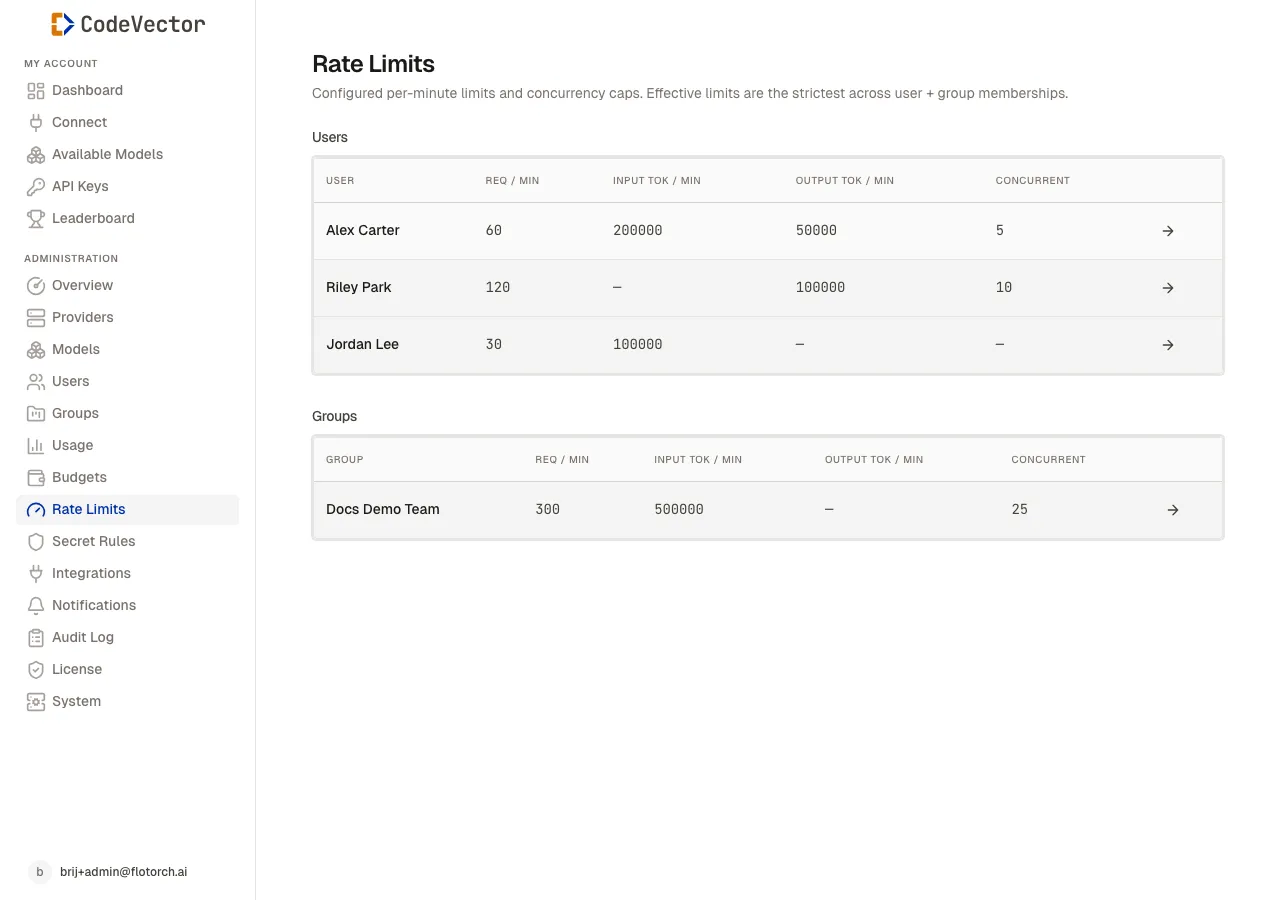
The Rate Limits page shows configured limits for users and groups in separate tables.
Open /admin/rate-limits to see an overview. The page has two sections:
- Users - per-user limits.
- Groups - per-group limits that apply to all members.
Each table shows:
- User / Group - linked to the detail page.
- Req / min - maximum requests per minute.
- Input tok / min - maximum input tokens per minute.
- Output tok / min - maximum output tokens per minute.
- Concurrent - maximum simultaneous requests.
Setting limits
Rate limits are configured from the user or group detail page, not from this overview. Open a user or group, find the Rate Limits card, and click Edit.
You can set any combination of:
- Requests per minute
- Input tokens per minute
- Output tokens per minute
- Max concurrent requests
Leave a field empty to impose no limit on that dimension.
How limits merge
When a user belongs to groups, the effective limit for each dimension is the strictest value across the user and all their groups. For example:
- User limit: 100 req/min
- Group A limit: 60 req/min
- Effective limit: 60 req/min
How enforcement works
Admission decisions are serialized in the database, so parallel requests are judged the same way as serial ones. Two requests fired at the same moment should not both slip past a concurrent_requests = 1 cap, and a burst should not push a per-minute counter past its limit. The same applies across multiple gateway containers behind a load balancer. If you see a limit exceeded in practice, please reach out so we can investigate.
For token-based limits, the gateway reserves a worst-case amount up front and reconciles to the real number after the request completes:
- Input tokens. Estimated pre-flight from the prompt size and reconciled with the provider’s authoritative count once the response returns. The bucket clamps at zero on overshoot, so the next request’s quota is never inflated by a previous over-estimate.
- Output tokens. Reserved against the user’s per-minute output cap based on the request’s
max_tokens(ormax_completion_tokens), and reconciled to the real completion length post-flight. The reservation usually overshoots - unused capacity is refunded automatically.
Output token overage policy
When a request’s worst-case output reservation would push a user over their per-minute output cap, CodeVector takes one of two actions, configured by the RATE_LIMIT_OUTPUT_OVERAGE_POLICY environment variable:
| Policy | Behavior | When to use |
|---|---|---|
reject (default) | Returns HTTP 429. The forwarded request is never modified. | Predictable, auditable enforcement. Recommended for most teams. |
clamp | Shrinks the request’s max_tokens to whatever’s left in the bucket and forwards. The response ends with a length stop when the cap is hit. | Lenient mode where you’d rather get a partial response than a 429. |
Heads up - overshoot risk in
rejectmode whenmax_tokensis omitted. If a request does not specifymax_tokens(ormax_completion_tokens), the gateway usesRATE_LIMIT_DEFAULT_MAX_OUTPUT_TOKENSfor cap math but does not modify the outgoing request. The upstream model’s own default may then generate more than that, briefly pushing the bucket over the cap. The next request from the same user will reject correctly. To eliminate this risk entirely, passmax_tokensexplicitly on every call, or switch toclampmode.
Examples
Single-user serial requests. User has requests_per_min = 10. They fire 12 requests in the same minute; the 11th and 12th return 429. The bucket resets at the next minute boundary.
Parallel burst against concurrency cap. User has concurrent_requests = 2. Their tool fires 8 streaming requests in parallel; exactly 2 succeed and the other 6 return 429. As each successful stream finishes, a new request can take its slot.
Output cap with implicit max_tokens. User has output_tokens_per_min = 1000. A request omits max_tokens. With RATE_LIMIT_DEFAULT_MAX_OUTPUT_TOKENS = 8192, the worst-case reservation is 8192 > 1000 - reject returns 429 immediately. Switching to clamp would forward the request with max_tokens = 1000 and let the response truncate at the cap.
Output cap with explicit small max_tokens. Same user (output_tokens_per_min = 1000), this time the request sets max_tokens = 200. The reservation fits, the request goes through, the model generates 150 tokens, and the unused 50 tokens are refunded to the bucket - leaving 850 available for the next request that minute.
Restart and crash recovery
The state behind every rate limit lives in PostgreSQL, not in any single gateway process. Restarts, scale events, and crashes do not reset a user’s limits; the next request they make is judged against the same accumulated state. Concurrency slots held by a gateway process that crashed mid-request are reclaimed after a configurable timeout, so a crash does not permanently consume a user’s slot.
What happens when a limit is hit
The gateway returns HTTP 429 with a Retry-After header indicating when the request can be retried. The request is not billed.
Frequently asked questions
What dimensions can I limit?
Requests per minute, input tokens per minute, output tokens per minute, and max concurrent requests.
How do user and group limits merge?
The strictest applicable limit wins across the user and all their groups.
What happens when a limit is hit?
The gateway returns a 429 response with a Retry-After header. The request is not billed.
Are limits enforced under parallel requests?
That is the whole point of how admission works. Decisions are serialized in PostgreSQL, so two requests fired at the same moment should not both bypass a concurrency or per-minute cap, and the behavior is the same across multiple gateway containers. If you do hit a case where a limit is exceeded, please open a support ticket.
What happens to my limits when the gateway restarts?
Nothing. The state lives in PostgreSQL, not in the gateway process, so restarts and scale events do not reset users’ usage windows.
How are output tokens enforced before the response is generated?
The gateway reserves the request’s max_tokens (or a configured fallback when omitted) against your output cap up front and reconciles to the real completion length after the response. Unused capacity is refunded back to the bucket so the next request gets the full remaining quota.