Settings
View runtime configuration and sync the bundled model catalog in CodeVector. Read-only - all values are loaded from environment variables at boot.
Your gateway URL
Pin your own gateway hostname and we'll rewrite the routes and curl examples on every docs page so you can click straight through to the live console. Stored locally in your browser.
The Settings page shows runtime configuration loaded at boot and lets you sync the bundled model catalog. Everything else on this page is read-only - to change a value, edit your environment and restart the server.
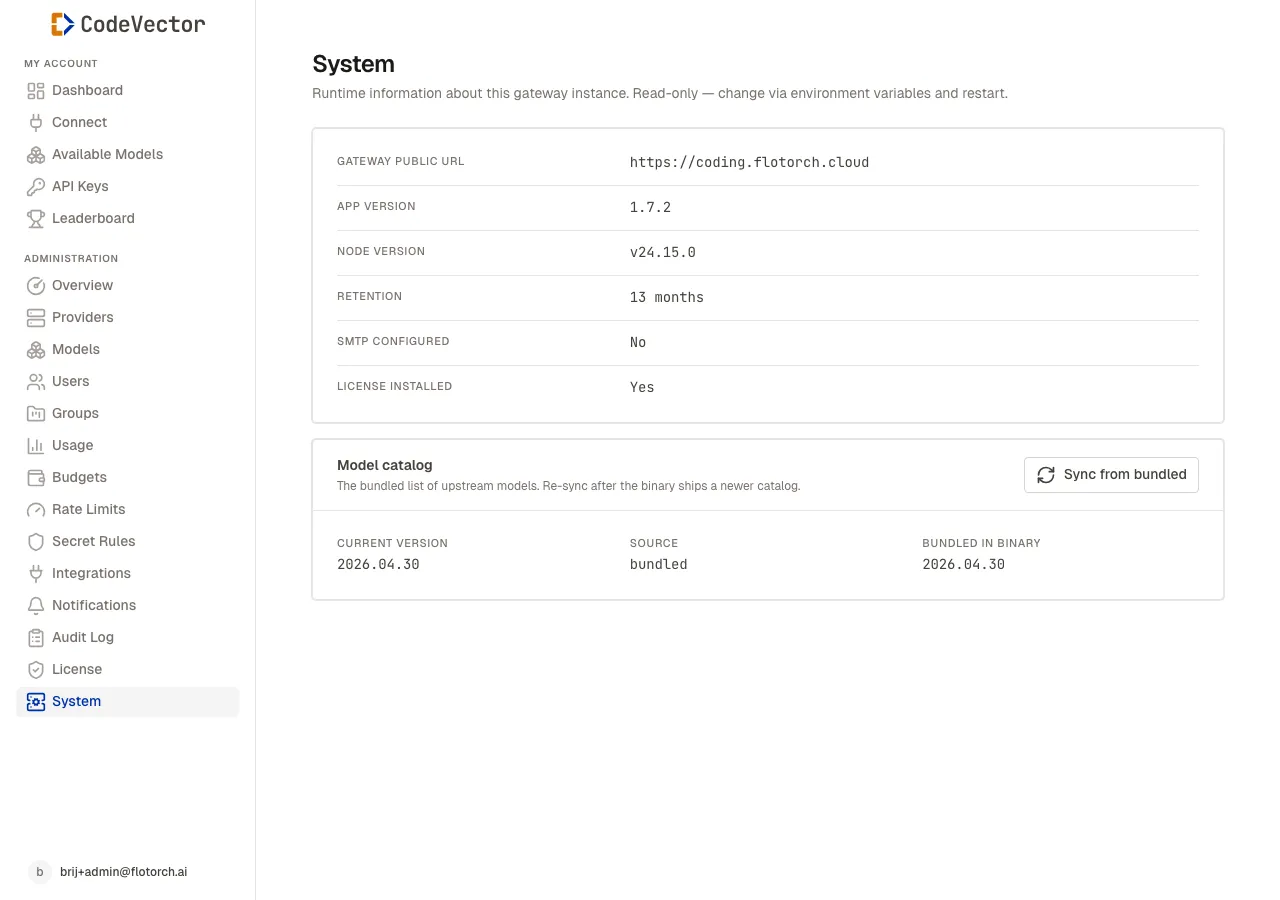
The Settings page at /admin/settings shows boot-time configuration and the catalog sync
controls.
Runtime configuration
Open /admin/settings to see the values the server loaded at boot:
- Gateway public URL - the URL clients should point at, set by
GATEWAY_PUBLIC_URL(or auto-built fromDOMAIN). - App version - the running build of CodeVector.
- Node version - the Node.js runtime version.
- Retention - audit log retention in months, set by
RETENTION_MONTHS(default 13). - SMTP configured -
YesifSMTP_HOSTis set,Nootherwise. Controls whether invite and password-reset email is sent. - License installed -
Yesif a validLICENSE_TOKENwas loaded.
All of these come from environment variables. The full list is in the Configuration reference.
Model catalog sync
The model catalog is the bundled source of truth for upstream model metadata - context windows, pricing, capability flags. It ships inside the binary and is versioned independently.
The Settings page shows three values:
- Current version - the catalog version currently applied to the database.
- Source - where the current catalog came from (
bundledor remote sync URL). - Bundled in binary - the catalog version baked into the running build.
When the bundled version is newer than the current version, a newer available badge appears next to Bundled in binary.
Sync from bundled
Click Sync from bundled to compute a diff between the bundled catalog and the database. The modal shows three counts:
- New - entries added since the current version.
- Updated - entries with changed pricing, context windows, or capability flags.
- Deprecated - entries removed from the bundled catalog. Existing rows are marked deprecated rather than deleted, so any Provider Models you’ve already imported keep working.
Expand each section to see the affected (provider, model id) pairs. Click Apply to commit the changes.
The sync never touches your Provider Models. Customer overrides on Provider Models always win. Syncing only updates the reference catalog that new imports read from. After applying, open a provider detail and click Import from catalog to bring new entries into that provider’s Provider Models.
Frequently asked questions
Why are these values read-only?
Runtime configuration is loaded from environment variables at boot. Changing a value means editing your .env file (or your secrets manager) and restarting the container. The console only displays the current state.
What is the model catalog?
The catalog is the bundled list of upstream models with default pricing and context windows. It ships in the binary and is the source of truth for new providers. Customer overrides on Provider Models always win; syncing never touches imported entries.
When should I sync the catalog?
After upgrading to a new release if the bundled catalog version is newer than the current applied version. The console shows a newer available badge when that’s the case.
What does “deprecated” mean in the diff?
Models removed from the bundled catalog are marked deprecated rather than deleted, so any existing Provider Models that referenced them are not orphaned. New imports skip deprecated entries.
Related docs
- Configuration. Full environment variable reference for every value shown on this page.
- Providers. Import models from the catalog into a provider after a sync.
- License. License state and seat usage.