Budget Limits
Set daily, weekly, and monthly spend caps for users and groups in CodeVector. The strictest applicable cap wins. Caps return a 403 when exceeded.
Your gateway URL
Pin your own gateway hostname and we'll rewrite the routes and curl examples on every docs page so you can click straight through to the live console. Stored locally in your browser.
Budget limits prevent runaway spend by capping how much a user or group can consume in a given time window. You can set daily, weekly, and monthly caps independently.
The Budgets page
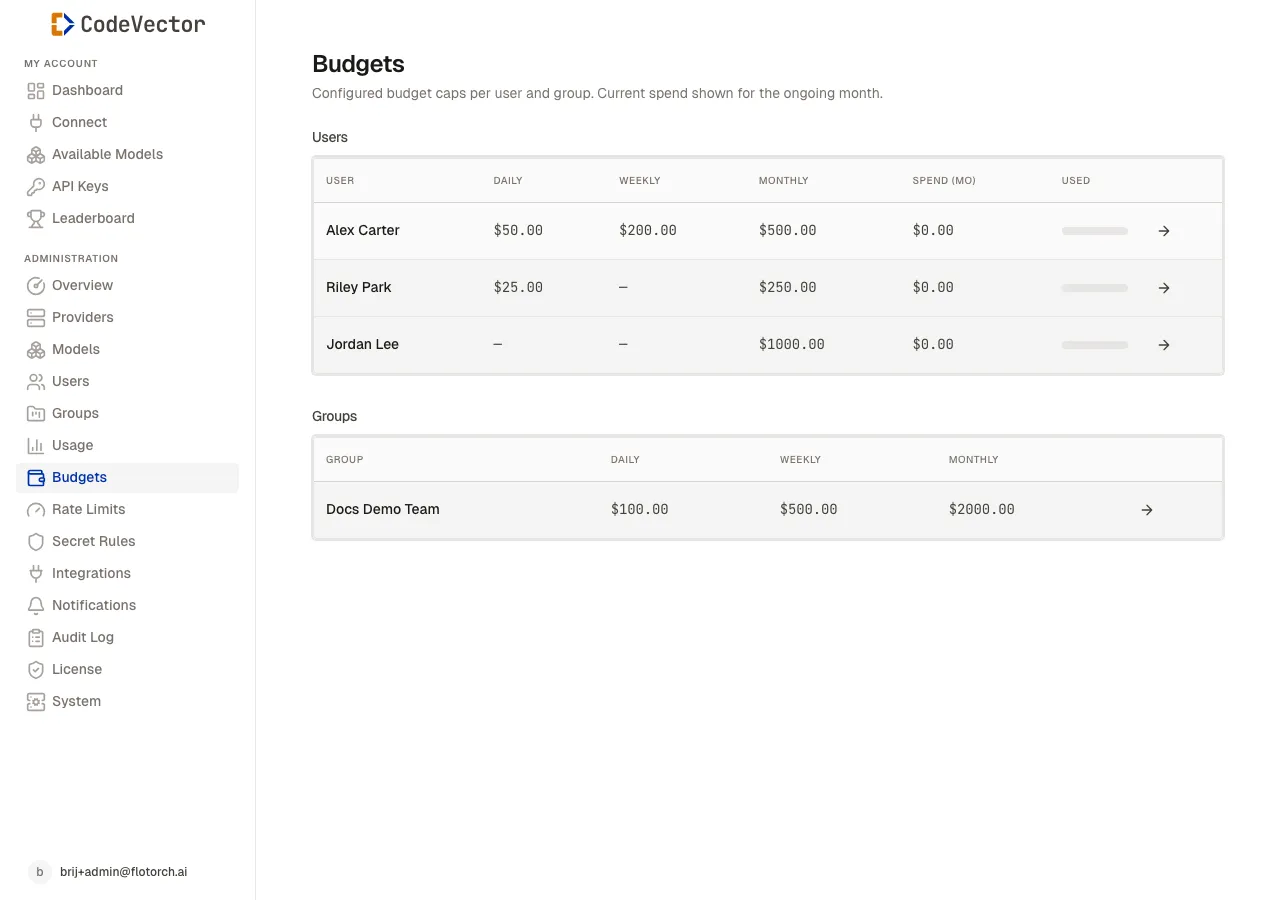
Open /admin/budgets to see an overview. The page has two sections:
- Users - per-user caps with current monthly spend shown.
- Groups - per-group caps.
Each table shows:
- User / Group - linked to the detail page.
- Daily - daily cap in USD.
- Weekly - weekly cap in USD.
- Monthly - monthly cap in USD.
- Spend (mo) - current spend for the ongoing month (users only).
- Used - progress bar showing spend against the monthly cap (users only).
Setting caps
Budget caps are configured from the user or group detail page. Open a user or group, find the Budget Limits card, and click Edit.
You can set any combination of:
- Daily cap
- Weekly cap
- Monthly cap
Leave a field empty to impose no cap on that window.
How caps merge
When a user belongs to groups, the effective cap for each window is the strictest value across the user and all their groups. For example:
- User monthly cap: $500
- Group A monthly cap: $100
- Effective cap: $100
What a group cap actually means
A group budget cap is a per-member ceiling, not a shared team pool. If you set a $500 daily cap on a 10-person group, each of those 10 people is individually capped at $500 per day. The group as a whole could spend up to $5,000 in a day.
There is no “group total spend” feature. If you need a hard ceiling on combined team spend, that is not supported today.
How enforcement works
Budget caps work the same way whether requests come in serially or in parallel. Before the gateway forwards a request to an upstream model, it reserves the request’s worst-case cost against every active window:
- Worst-case cost is the input estimate priced at the model’s input rate, plus the request’s
max_tokenspriced at the output rate. If the caller omitsmax_tokens, a configured fallback fills in. Either way, the reservation is the largest amount the request could plausibly cost. - After the request completes, the reservation is reconciled to the real cost. The difference, usually a refund since most responses are shorter than the reservation, flows back into the bucket.
- Reservation, reconciliation, and threshold-alert writes go to the same database that drives the console, so the numbers you see match the numbers enforcement used.
Because the reservation lands before the upstream call, parallel requests are all judged against the same running balance, including in-flight reservations. A request whose worst-case would push the user over their cap is rejected before it touches an upstream provider. No software is bug-free; if you see spend exceed a cap in practice, please reach out so we can investigate.
Examples
Daily cap, single request. User has a $10 daily cap and has spent $4.20 today. They send a request that could cost up to $1.50 in the worst case. The reservation fits ($4.20 + $1.50 <= $10), the request goes through, the response actually costs $0.30, and the bucket settles at $4.50 - refunding the unused $1.20.
Daily cap, parallel burst. Same user at $4.20 spent. Their tool fires 10 parallel requests, each with a $1.50 worst case. The first 4 fit ($4.20 + 4x$1.50 = $10.20 - wait, the 4th one pushes over, so only 3 fit: $4.20 + 3x$1.50 = $8.70). Requests 4 through 10 return 402. As actuals come in and refund unused capacity, the bucket relaxes for the next minute’s traffic.
Cap exceeded by a single oversized request. User has a $5 daily cap, $0 spent, and submits a request that could cost up to $8 in the worst case. The reservation is rejected immediately, so the user does not get a half-finished call or a surprise charge. They can lower their max_tokens or wait for the next window.
Restart and crash recovery
Spend state lives in PostgreSQL, not in any single gateway process. Restarting the gateway, scaling up or down, or recovering from a crash never resets a user’s running spend or refunds in-flight reservations incorrectly. The next request a user makes is judged against the same accumulated state.
What happens when a cap is exceeded
The gateway returns HTTP 403 with a budget_exceeded error. The request is not forwarded to the provider and is not billed.
Frequently asked questions
What windows are available?
Day, week, and month. Each is independent - you can set all three or just one.
How do user and group budgets merge?
The strictest applicable cap wins across the user and all their groups. If a user has a $500 monthly cap and belongs to a group with a $100 monthly cap, the effective cap is $100. If the user belongs to two groups with $100 and $200 caps, the effective cap is $100. There is no additive or per-group switching behavior.
What happens when a budget is exceeded?
The gateway returns a 403 with a budget_exceeded error. The request is not forwarded to the provider.
Can a user blow past their cap with parallel requests?
That is the whole point of reserving costs up front. Each request’s worst-case is charged against the running balance before the upstream call, so a burst of parallel requests cannot all sneak past on the same prior balance. If you do see spend exceed a cap, please open a support ticket so we can look into it.
What happens to my budget state when the gateway restarts?
Spend lives in PostgreSQL, not in the gateway process, so restarts and scale events do not reset users’ spend windows. Pending reservations whose owning gateway process crashes are reclaimed automatically after a configurable window.